Entradas

WRF open_aux_u : error opening auxinput5_d02_2013-12-31_00:00:00 for reading. 100

Imagen
So, i got this error: open_aux_u Timing for Writing /scr4/sibarra/masp/health/wrfo for domain        2:    4.14512 elapsed seconds open_aux_u : error opening auxinput5_d02_2013-12-31_00:00:00 for reading. 100 pretty weird because it a met run. According to http://forum.wrfforum.com/viewtopic.php?f=47&t=10003, they recommend diminishing the number of processors. I ran with 32 and got stuck I ran with 16 and appear this error open_aux_u : error opening auxinput5_d02_2013-12-31_00:00:00 for reading. 100 I'm running with  8 and still running. 

ERROR: Grib2 file or date problem, stopping in edition_num. Can't ungrib.exe SOLVED

Imagen
Well, it seems that this problem can be very common. Usually, you have a directory for downloading the meteorology from NCEP/UCAR. Probably, you will have the script for downloading the data in the same directory. If you link the grib files based on the name there won't be any problems ./link_grib.csh /path/GFS* However, it could be possible to link the whole directory. You might do this when you have a whole year of meteorological data. ./link_grib.csh /path/ If you have scripts for downloading the met data in the same directory, THEN you will have the message: ERROR: Grib2 file or date problem, stopping in edition_num To avoid this error, just move the script for downloading the met data elsewhere and link the directory again. Finally, do ungrib.exe UPDATE 2018-12/15 (I mean 15 of December of 2018) I had the same problem again, and with the same data! and this solution did not work till i did this: ./link_grib.csh /path/GFS Yes only the first letters, in ...

Como compilar CALWRF con diferentes compiladores y versiones de WRF

Imagen
mi compañero de la Universidad Mario Gavidia, publico en su blog como compilar CALWRF con ifort y correr el programa con datos de salida de WRF o WRF-Chem: Basicamente tienes que cambiar el compilador en compile.sh y cambiar algunas lineas de calwrf.f El link es aqui:  https://randroll.wordpress.com/2018/04/18/installing-calwrf-on-linux-with-ifort/

Como adicionar o code coverage (codecov) no teu pacote R?

Imagen
A seguir os pasos para adicionar codecov, do blog  Eryk Walczak ,  How to add code coverage (codecov) to your R package? library(devtools) library(testthat) use_testthat() Logo, adiciona a função test. Eu usei a função 'cpt' do meu pacote   cptcity , do arquivo web das cores   cptcity  http://soliton.vm.bytemark.co.uk/pub/cpt-city/ use_test("cpt") Isot cria o arquivo test-cpt.R onde foram feitos os tests. Aqui, eu mudei a opção por default para ficar: test_that("cpt works", {   expect_equal(cpt("mpl_inferno", 10),                c("#000004", "#1B0C41", "#4B0C6B", "#781C6D",                  "#A52C60", "#CE4346", "#ED6925", "#FB9906",                  "#F7D03C", "#FCFFA4")                ) }) Logo rodei use_coverage(pkg = ".", type = c("codecov")) ...

Como agregar code coverage (codecov) en tu paquete de R?

Imagen
A continuación los pasos para agregar codecov, traducidos del blog  Eryk Walczak , del post  How to add code coverage (codecov) to your R package? library(devtools) library(testthat) use_testthat() Luego agrega una funcion test. En mi  caso use la funcion cpt de mi paquete cptcity , del archivo cptcity  http://soliton.vm.bytemark.co.uk/pub/cpt-city/ use_test("cpt") Esto crea el archivo test-cpt.R donde se realizan los tests. aqui modifique la opcion por default para que quedara: test_that("cpt works", {   expect_equal(cpt("mpl_inferno", 10),                c("#000004", "#1B0C41", "#4B0C6B", "#781C6D",                  "#A52C60", "#CE4346", "#ED6925", "#FB9906",                  "#F7D03C", "#FCFFA4")                ) }) luego corrí use_cove...

Instalando R.3.4.3 en servidorcon usuairo local y algunos paquetes 'units'

1 ./configure --with-recommended-packages=no --without-x --with-cairo --with-libpng --with-libtiff --with-jpeglib --enable-R-shlib # instalo en /scr4/sibarra/R-3.4.3 2 /scr4/sibarra/R-3.4.3/bin/R 3 system("locate udunits.h") # /scr2/npillar/WRF/STUFF/include/udunits2.h 4  install.packages("units", configure.args=c("units" = "--with-udunits2-include=/scr2/npillar/WRF/STUFF/include/"))  Las librerias son instaladas en  R-3.4.3/library/

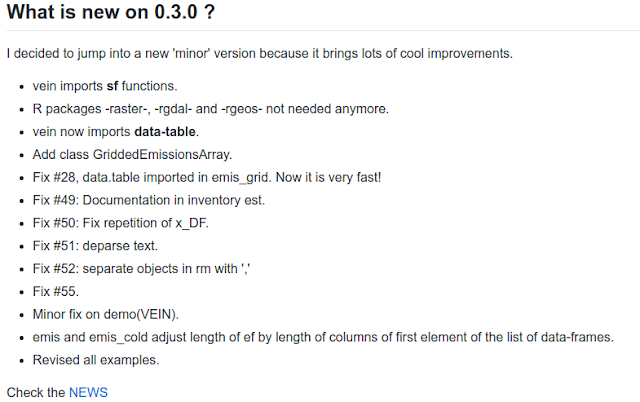
Nueva version de VEIN 0.3.0

Imagen
VEIN significa Vehicular Emissions INventory. Es un paquete de R que desarrollé en mi doctorado en meteorologia de la USP. Este programa permite calcular inventarios de emisiones bottom-up muy rapido. Además, se une a modelo atmosferico como WRF-CHEM, y otros. Para bajar: # 0.3.0 library(devtools) install_github("atmoschem/vein") library(vein) demo(VEIN) or # 0.2.3 install.packages("vein") library(vein)